- Home
- Articles
- Government services
- How to update Aadhaar address online (free until June 2027)
How to update Aadhaar address online (free until June 2027)
Log in to myAadhaar, choose Address, upload a valid proof and submit — free online until 14 June 2027. Valid documents, Head of Family option, fees and status check.
On this page
- Three ways to update your Aadhaar address
- Method 1: Update address online with your own proof
- Method 2: Head of Family (HoF) address update
- Valid proof of address documents
- Fees at a glance (2026)
- How to check your update status
- If your request is rejected
- No mobile linked? Do this first
- After updating, update these too
- Frequently asked questions
Quick answer: Go to myaadhaar.uidai.gov.in, log in with your Aadhaar number and OTP, choose Address Update → Update Aadhaar Online, type the new address, upload a valid proof of address and submit. Save the URN (Update Request Number) to track it. Updating documents online is free until 14 June 2027; a demographic update at an Aadhaar centre costs ₹75.
Key takeaways
- You need a mobile number linked to Aadhaar to update online. No linked mobile = visit an Aadhaar Seva Kendra.
- The proof must be in your name and show the full new address. No proof? Use the Head of Family option.
- Address updates have no lifetime limit, unlike name (twice), gender and date of birth (once).
- Most updates are approved within a few days; UIDAI's outer limit is up to 30 days.
- Never share your OTP — UIDAI, banks and officials never ask for it.
Moved to a new city, shifted to your own flat, or got married? Your Aadhaar address is used by banks, mobile operators, LPG agencies and government schemes, so keeping it current saves trouble later. This guide covers every way to change it — online with your own proof, online through a family member, and at a centre — along with the fees, accepted documents and what to do if the request is rejected.
", displaying 2026 realistic price spectrums, hardware versus labor allocation, step-by-step workflow, clean modern UI cards, high precision vector layout.")
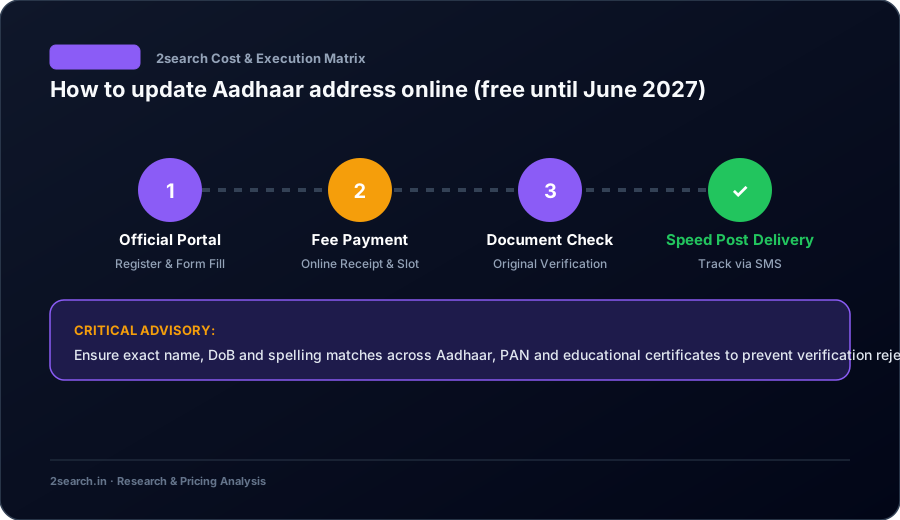
Three ways to update your Aadhaar address
| Method | When to use it | Fee | Mobile OTP needed? |
|---|---|---|---|
| Online with your own proof (myAadhaar) | You have a document in your name with the new address | Free until 14 June 2027 | Yes |
| Online via Head of Family (HoF) | The proof is in a parent's or spouse's name | Small service fee shown at payment | Yes (both people) |
| At an Aadhaar Seva Kendra / enrolment centre | No linked mobile, or you want staff to help | ₹75 | No |
Method 1: Update address online with your own proof
- Open myaadhaar.uidai.gov.in and click Login.
- Enter your Aadhaar number and the captcha, then the OTP sent to your registered mobile.
- Click Address Update, then Update Aadhaar Online.
- Read the instructions and click Proceed to Update Aadhaar.
- Select Address and click Proceed to Update Aadhaar again.
- Enter the new address exactly as written on your proof — house number, street, locality, PIN code, district and state. You can also add a "care of" (C/O) name if you want.
- Choose the document type from the list and upload a clear scan (colour PDF, JPEG or PNG, within the size limit shown).
- Review the preview. Tick the declaration and submit. If a fee applies, pay online.
- Note the URN shown on screen and in the SMS. Download the acknowledgement.
Tip: Scan the full page of the document, not a cropped photo. Blurry or cut-off scans are the most common reason for rejection.
Method 2: Head of Family (HoF) address update
This option helps if you live with family and have no proof in your own name — for example, a newly married woman moving to her husband's home, or a student living with parents.
- Log in to myAadhaar and choose Address Update → Update Address via Head of Family.
- Enter the HoF's Aadhaar number. The HoF must be an adult whose Aadhaar already has the correct address.
- Upload a relationship proof — for example a marriage certificate, ration card, passport or a family certificate that shows both names. If you have none, a self-declaration format from UIDAI is accepted in some cases.
- Pay the service fee and submit. You get an SRN.
- The HoF gets an SMS and must log in to myAadhaar within 30 days to approve the request. If the HoF rejects it or doesn't respond, the request closes and the fee is not refunded.
Valid proof of address documents
UIDAI publishes a list of supporting documents. The ones most people use:
- Passport
- Bank statement or passbook (signed and stamped, or with photo)
- Electricity, water, gas or landline / broadband bill — usually not older than 3 months
- Ration card or PDS photo card
- Voter ID (Election Photo ID)
- Registered rent, lease or leave-and-licence agreement
- Property tax receipt (not older than one year)
- Insurance policy (life or medical)
- Certificate of address issued by a gazetted officer or Tehsildar on the UIDAI format
- Vehicle registration certificate
- Pensioner card, freedom fighter card, Kisan passbook or arms licence
Warning: An unregistered rent agreement (just on stamp paper) is often rejected. Use a registered agreement or another document from the list.
Fees at a glance (2026)
| Service | Where | Fee |
|---|---|---|
| Document update (proof of identity / address) | Online on myAadhaar | Free until 14 June 2027 |
| Document update | At a centre | ₹75 |
| Demographic update — name, address, gender, date of birth, mobile, email | At a centre | ₹75 |
| Biometric update — photo, fingerprints, iris | At a centre | ₹125 |
| Mandatory biometric update for children (5–7 and 15–17) | At a centre | Free |
| New Aadhaar enrolment | Anywhere | Free |
If anyone asks for more than these amounts at a centre, you can complain to UIDAI on 1947 or by email to help@uidai.gov.in.
How to check your update status
- Go to myaadhaar.uidai.gov.in → Check Enrolment & Update Status.
- Enter your URN (or SRN for HoF requests) and the captcha.
- Statuses you may see: In progress, Completed, or Rejected (with a reason).
Once it says Completed, download the updated e-Aadhaar from the same site, or let it sync to DigiLocker. The new physical letter comes by post; you can also order a PVC Aadhaar card online for a small fee.
If your request is rejected
Common reasons and what to do:
| Rejection reason | Fix |
|---|---|
| Document not clear or incomplete | Upload a full, readable colour scan of all relevant pages |
| Name on document doesn't match Aadhaar | Use a document with your name exactly as on Aadhaar, or update the name first |
| Address entered differs from the proof | Type the address word-for-word from the document |
| Document type not valid | Choose a document from the UIDAI list; avoid unregistered agreements |
| HoF didn't approve | Ask the HoF to log in within 30 days, then try again |
You can submit a fresh request right away. Each rejection is useful — the reason tells you exactly what to change.
No mobile linked? Do this first
The online route needs an OTP. If your mobile number isn't linked or has changed:
- Book an appointment at an Aadhaar Seva Kendra via the Book an Appointment page, or walk into a bank or post office enrolment centre.
- Fill the update form for mobile number (₹75). Biometric authentication is done on the spot.
- Once the new number shows on myAadhaar (usually within a few days), you can update the address online for free.
After updating, update these too
Your new Aadhaar address doesn't change other records automatically. Update it with:
- Your bank (re-KYC) and mutual fund / demat accounts
- EPFO — so your PF records match (see how to check PF balance)
- LPG connection and electricity provider
- Voter ID if you've moved constituencies (see voter ID apply online)
- Driving licence at the new RTO (see apply for driving licence online)
Frequently asked questions
How many times can I change my address in Aadhaar?
There is no fixed lifetime limit for address updates. Name can be changed twice, and gender and date of birth only once, without special approval.
How long does an Aadhaar address update take?
Most online updates are completed within a few days. UIDAI can take up to 30 days in some cases.
Is the Aadhaar address update really free?
Yes, online document updates on myAadhaar are free until 14 June 2027. At an Aadhaar centre, a demographic update costs ₹75.
Can I update my address without any document?
Not on your own. If you have no proof in your name, use the Head of Family option or a certificate from a gazetted officer on the UIDAI format.
Can I update my address to a different state?
Yes. Aadhaar is valid across India, so you can update to any address in any state with a valid proof.
Do I need to get a new Aadhaar number after moving?
No. Your Aadhaar number never changes; only the details on it are updated.
How do I download Aadhaar after the address update?
Log in to myAadhaar and click Download Aadhaar, or open DigiLocker. The e-Aadhaar PDF password is the first four letters of your name in capitals plus your birth year.